Fantasy football advice is only as useful as the data behind it. An AI assistant that does not understand PPR scoring, weekly projections, positional rankings, and recent results is not reasoning about your lineup—it is guessing.
In this tutorial, we will build the data layer for a league-aware fantasy football assistant. The finished app loads a user's roster, retrieves scoring-aware weekly data from the BALLDONTLIE NFL API, and turns that context into an explanation an AI model can use when comparing lineup options.
The goal is not to promise a guaranteed win or replace a legal lineup optimizer. The goal is to give fantasy products a repeatable, evidence-based workflow that helps users make better decisions every week and evaluate those decisions after the games are over.
New to the API? Start with our Getting Started guide to create an API key.
The NFL fantasy endpoints require GOAT tier access. The tutorial uses that access to retrieve the scoring-aware fantasy data described below.
What We're Building
Our assistant will:
- Accept a season, week, scoring format, and roster player IDs.
- Load weekly projections for those players.
- Load rankings and positional ranks for a supported ranking type.
- Load the previous week's observed fantasy results when available.
- Preserve player, team, and game relationships for the AI model.
- Produce a structured prompt that asks an AI model for an explainable recommendation.
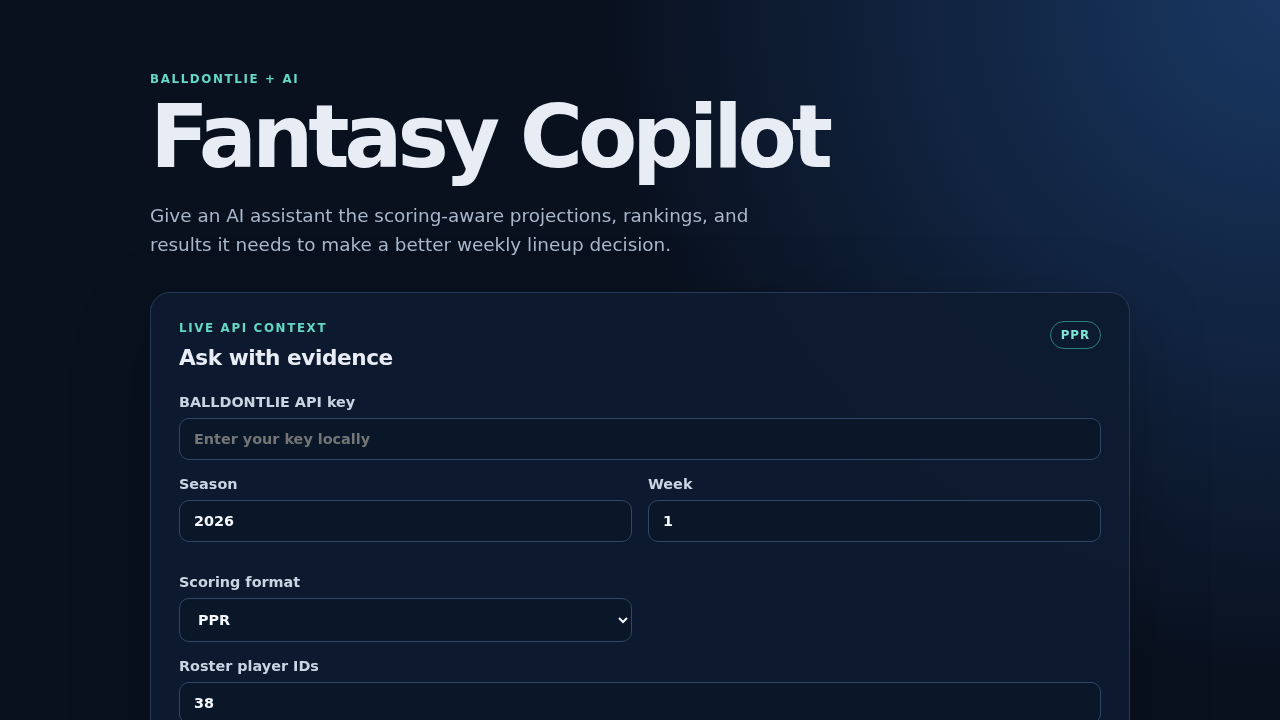
The example project is a small React application included with this tutorial. It loads the scoring definitions returned by the API, lets you choose a format, and prepares a prompt-ready context for your AI model.
Why the Data Layer Matters
The user's league settings, roster, opponent, and matchup rules belong in the application that you build. The fantasy API supplies the player-level evidence that the assistant can analyze:
| Question | API data used |
|---|---|
| Who has the best outlook this week? | Weekly projections |
| Does the scoring format change the result? | Scoring formats and format-specific totals |
| How is this player ranked at the position? | Rankings and positional rank |
| Is the projection consistent with recent output? | Completed weekly stats |
| What game and team context should the assistant mention? | Linked player, team, and game objects |
Projection and weekly-stat records return all available scoring variants. Ranking records similarly include the available ranking variants. Your application can select PPR, half-PPR, standard, or another available format for ordering and comparison while preserving the other variants for analysis.
Scoring-format keys and ranking types are separate concepts. The example uses the supported ppr ranking type when a user selects half-PPR, while still using half-PPR projected and observed points.
Prerequisites
- Node.js 20.19 or newer
- A BALLDONTLIE API key from app.balldontlie.io
- GOAT tier access, which is required for the NFL fantasy endpoints
- A roster represented by BALLDONTLIE player IDs
- Basic TypeScript and React knowledge
- An AI model provider for the final explanation step
Never commit an API key. The demo accepts one in memory for local testing. A production application should make API requests through a server-side route or other protected backend.
Step 1: Create the Application
Create a Vite React TypeScript application:
npm create vite@latest ai-fantasy-assistant -- --template react-ts
cd ai-fantasy-assistant
npm install
npm run dev
The example project in this repository includes the completed UI and can be run with:
cd examples/ai-fantasy-assistant
npm install
npm run dev
The UI asks for a season, week, scoring format, roster IDs, and an API key. It keeps the key in memory and displays the evidence returned by the API.
Step 2: Create a Reusable API Helper
Fantasy filters such as player_ids[] are repeated query parameters. This helper handles those arrays and keeps authentication in one place:
const API_BASE = "https://api.balldontlie.io";

type QueryValue = string | number | number[];

function buildQuery(params: Record<string, QueryValue>) {
  const query = new URLSearchParams();
  for (const [key, value] of Object.entries(params)) {
    if (Array.isArray(value)) {
      value.forEach((item) => query.append(`${key}[]`, String(item)));
    } else {
      query.set(key, String(value));
    }
  }

  return query;
}

async function getFantasyData(
  path: string,
  params: Record<string, QueryValue>,
  apiKey: string
) {
  const response = await fetch(
    `${API_BASE}${path}?${buildQuery(params).toString()}`,
    { headers: { Authorization: apiKey } }
  );

  if (!response.ok) {
    throw new Error(`API request failed with status ${response.status}`);
  }
  return response.json();
}
The API key is passed into the function instead of hardcoded. In a deployed app, call this helper from a protected server-side route.
Step 3: Load Weekly Fantasy Context
Now load the data an AI assistant needs to compare lineup options. The API uses week to return weekly lineup projections. Rankings are season snapshots, and completed stats require a specific historical week.
export type ServerContextParams = {
  season: number;
  week: number;
  playerIds: number[];
  scoringFormat: string;
  rankingType?: string;
};

export async function buildWeeklyFantasyContext(
  params: ServerContextParams,
  apiKey: string
) {
  const {
    season,
    week,
    playerIds,
    scoringFormat,
    rankingType = "ppr",
  } = params;

  const [scoringFormats, projections, rankings] = await Promise.all([
    getFantasyData(
      "/nfl/v1/fantasy/scoring_formats",
      { season, per_page: 100 },
      apiKey
    ),
    getFantasyData(
      "/nfl/v1/fantasy/projections",
      {
        season,
        week,
        player_ids: playerIds,
        scoring_format: scoringFormat,
        per_page: 100,
      },
      apiKey
    ),
    getFantasyData(
      "/nfl/v1/fantasy/rankings",
      {
        season,
        player_ids: playerIds,
        ranking_type: rankingType,
        per_page: 100,
      },
      apiKey
    ),
  ]);

  const previousWeek =
    week > 1
      ? await getFantasyData(
          "/nfl/v1/fantasy/weekly_stats",
          {
            season,
            week: week - 1,
            player_ids: playerIds,
            scoring_format: scoringFormat,
            per_page: 100,
          },
          apiKey
        )
      : null;

  return {
    scoringFormat,
    rankingType,
    scoringFormats,
    projections,
    rankings,
    previousWeek,
  };
}
For a Week 4 assistant, this loads Week 4 projections and Week 3 results. For Week 1, there is no previous regular-season week to request, so the application should handle that case explicitly.
Step 4: Turn the Data Into an AI Prompt
The assistant should receive the user's league context alongside the API context. The API does not know a user's private roster, opponent, bench rules, or custom lineup constraints; your application does.
Keep this step on the server side. The browser demo prepares the prompt-ready context, but the API key and model credentials should remain in a protected route or backend service.
The example project includes the same server-side context loader in src/serverExample.ts; it is compiled as part of the validation build even though the browser UI does not call it directly.
import { buildServerPrompt } from "./serverExample";

// These records come from an application's league and roster store.
export async function createPrompt(serverApiKey: string) {
  const roster = [{ playerId: 38, slot: "QB" }];
  const opponent: unknown[] = [];
  const rosterPlayerIds = roster.map((player) => player.playerId);

  return buildServerPrompt(
    {
      league: {
        scoring: "ppr",
        starters: ["QB", "RB", "RB", "WR", "WR", "TE", "FLEX", "K", "DST"],
      },
      roster,
      opponent,
      context: {
        season: 2026,
        week: 4,
        playerIds: rosterPlayerIds,
        scoringFormat: "ppr",
        rankingType: "ppr",
      },
    },
    serverApiKey
  );
}

// Call `createPrompt` from your protected server route.

// Send `prompt` to your preferred AI model from a server-side route.
The instruction to cite evidence is important. It encourages the model to explain a recommendation using projected points, rank, recent output, and game context instead of producing an unsupported start/sit answer.
Step 5: Add a Local Evidence View
Before adding an AI model, show the raw evidence in the UI. This makes the product easier to debug and gives users a transparent reason for the recommendation.
function getPoints(record: FantasyRecord, key: string) {
  return (
    record.projections?.find((item) => item.scoring_format.key === key)
      ?.total_points ?? 0
  );
}

function getRank(record: Pick<FantasyRecord, "rankings">, key: string) {
  return record.rankings?.find((item) => item.type === key);
}

function getPreviousPoints(record: FantasyRecord, key: string) {
  return (
    record.fantasy_points?.find((item) => item.scoring_format.key === key)
      ?.total_points ?? null
  );
}

function rankingTypeForScoringFormat(scoringFormat: string) {
  return scoringFormat === "half_ppr" ? "ppr" : scoringFormat;
}

const rows = useMemo(() => {
  if (!context) return [];

  return context.projections.data
    .map((record) => {
      const rank = getRank(
        context.rankings.data.find(
          (item) => item.player?.id === record.player?.id
        ) ?? { rankings: [] },
        context.rankingType
      );
      const previous = context.previousWeek?.data.find(
        (item) => item.player?.id === record.player?.id
      );

      return {
        record,
        projection: getPoints(record, context.scoringFormat),
        rank: rank?.position_rank ?? null,
        previous: previous
          ? getPreviousPoints(previous, context.scoringFormat)
          : null,
      };
    })
    .sort((a, b) => b.projection - a.projection);
}, [context]);
The complete example project renders this table, produces a local highest-projection comparison, and exposes a prompt-ready context before any model call. It intentionally does not label a player “start” without roster eligibility and lineup constraints; those rules belong in your application.
What This Enables
Once this data flow works, a product can add features such as:
- Start/sit comparisons for every roster position.
- Matchup-aware lineup explanations using the user's opponent roster.
- Draft boards combining ADP, rankings, and auction values.
- Weekly projection-versus-result tracking.
- Confidence flags when rankings, projections, and recent results disagree.
- D/ST recommendations using team records and linked game context.
- A season-long assistant that learns which signals its users trust.
The API supplies the evidence. Your application supplies the league state, and your AI layer turns both into a useful experience.
Other NFL Data You Can Add
The fantasy context becomes more useful when combined with the regular NFL API:
/nfl/v1/playersfor searchable player profiles./nfl/v1/teamsfor team metadata and D/ST context./nfl/v1/gamesfor schedules, game status, and linked game IDs./nfl/v1/statsand season stats for additional observed performance./nfl/v1/playsfor play-by-play detail when your product needs deeper analysis.
Use the player, team, and game IDs from fantasy responses to look up related data through these NFL endpoints.
Beyond NFL Fantasy
The same BALLDONTLIE platform supports NBA, MLB, NHL, EPL, WNBA, NCAAF, and NCAAB data in addition to NFL. That makes it possible to build a broader sports assistant, analytics dashboard, or multi-sport AI agent on the same API patterns.
For more examples of using structured sports data with AI, read Let AI Write Your Sports Data Scripts. For a broader analytics workflow, see Why Backtesting Matters.
Start Building
The fantasy endpoints are available in the NFL API documentation. They require GOAT tier access. Create an appropriately tiered API key at app.balldontlie.io, run the example project, and connect the returned context to your preferred AI model.
If you have questions or want to share what you build, join the BALLDONTLIE Discord community.
An AI assistant cannot guarantee a championship. It can, however, replace unsupported guesses with a repeatable process grounded in the scoring format, projections, rankings, and results that matter to the user's league.