Want to analyze sports data in a spreadsheet? With the BALLDONTLIE Google Sheets integration, you can pull live stats, standings, odds, and more directly into your cells - no coding required.
Who is this for?
This guide is perfect for:
- Fantasy sports players tracking player stats and projections
- Sports bettors comparing odds and building models in spreadsheets
- Sports analysts who prefer working in Excel/Sheets over code
- Researchers collecting sports data for analysis
- Anyone who wants sports data without writing code
What You Can Do
With our Google Sheets functions, you can:
- Pull live game scores and schedules
- Get player statistics and season averages
- Access team rosters and standings
- Compare betting odds from major sportsbooks
- Track player injuries
- And much more across 20+ sports leagues
Step 1: Get Your API Key
First, you'll need a BALLDONTLIE API key:
- Go to app.balldontlie.io/signup
- Create a free account
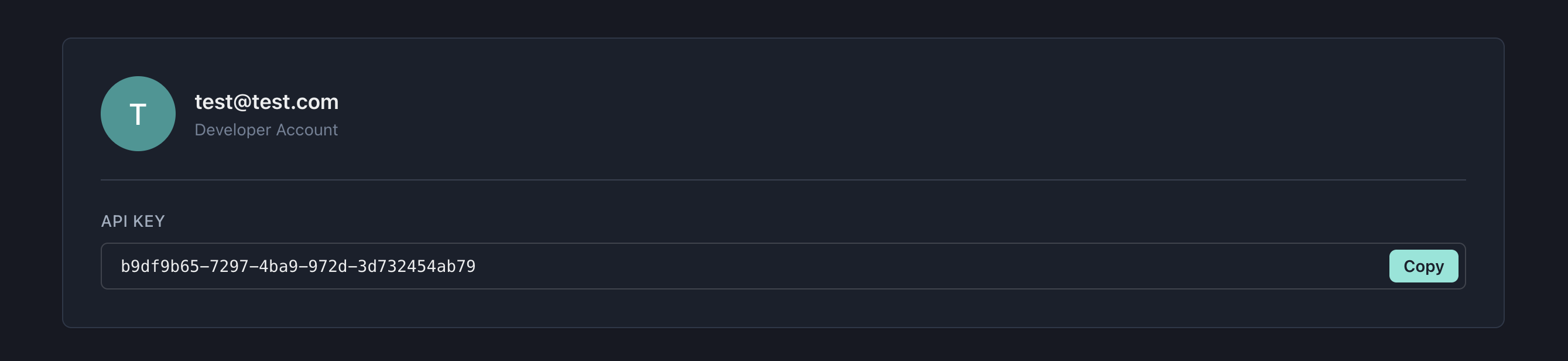
- Copy your API key from the dashboard
Step 2: Add the Script to Google Sheets
- Open any Google Sheet (or create a new one)
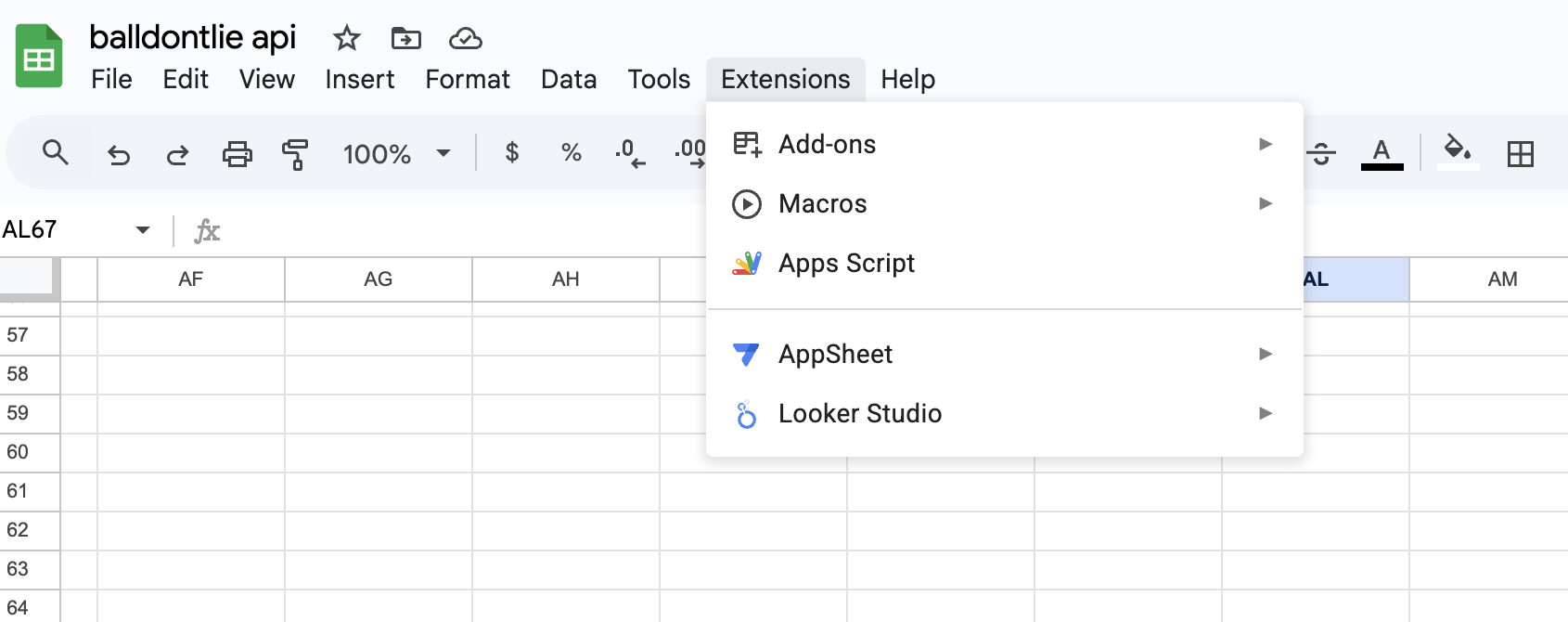
- Click Extensions in the menu bar
- Select Apps Script
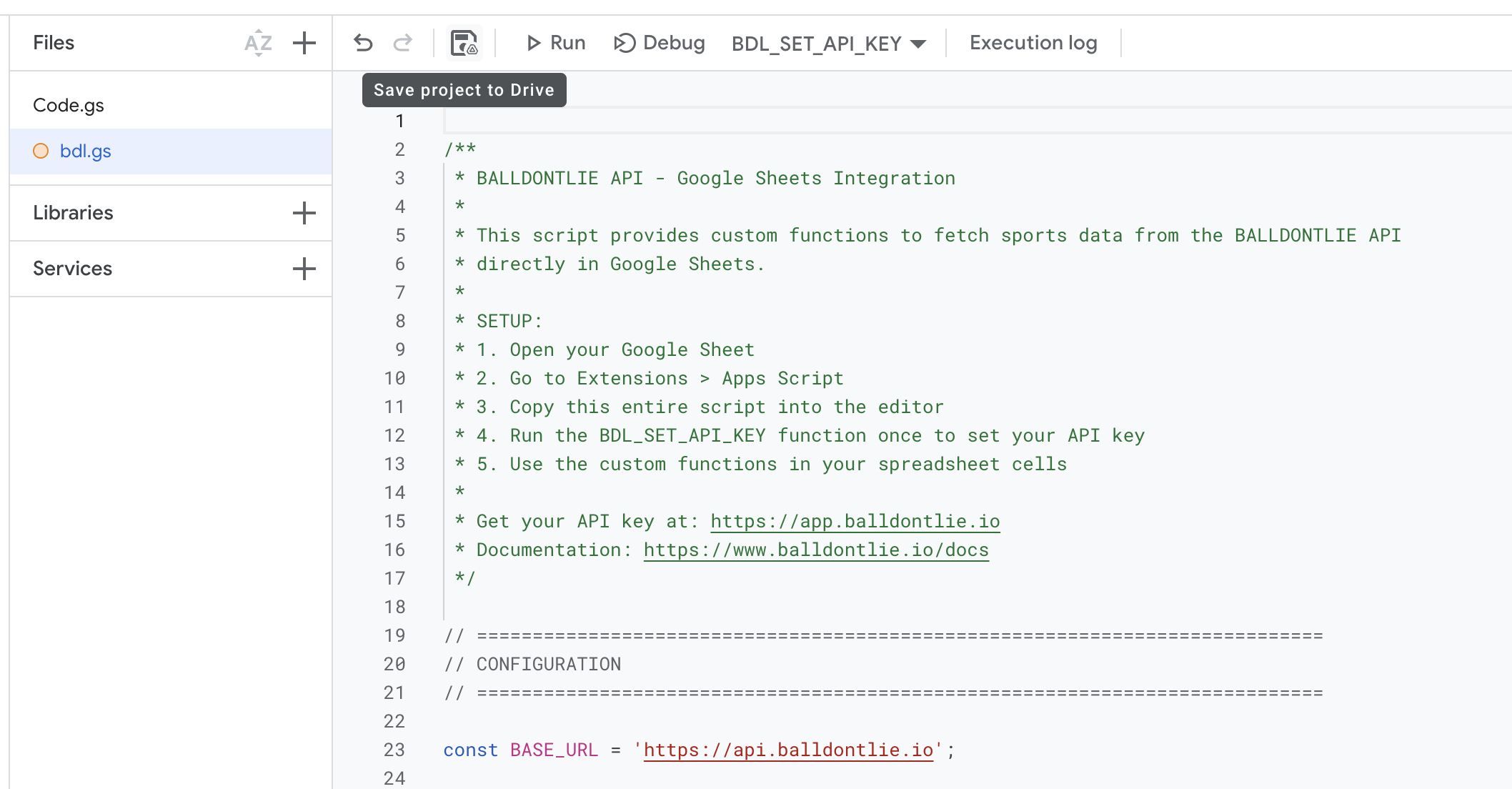
- Delete any placeholder code in the editor
- Go to balldontlie.io/google-sheets/balldontlie.gs
- Copy the entire script (Ctrl+A, then Ctrl+C)
- Paste it into the Apps Script editor (Ctrl+V)
- Click the Save icon (or press Ctrl+S)
Step 3: Set Your API Key
Before using any functions, you need to save your API key. In any cell, type:
=BDL_SET_API_KEY("your-api-key-here")
Replace your-api-key-here with your actual API key. Press Enter and you should see "API key saved successfully!"
You only need to do this once - the key is stored securely in your Google account.
Step 4: Start Fetching Data
Now you can use any of the 150+ available functions. Just type them in a cell like any other spreadsheet formula.
Example: Get NBA Teams
In any cell, type:
=BDL_NBA_TEAMS()
Press Enter, and watch the data populate:
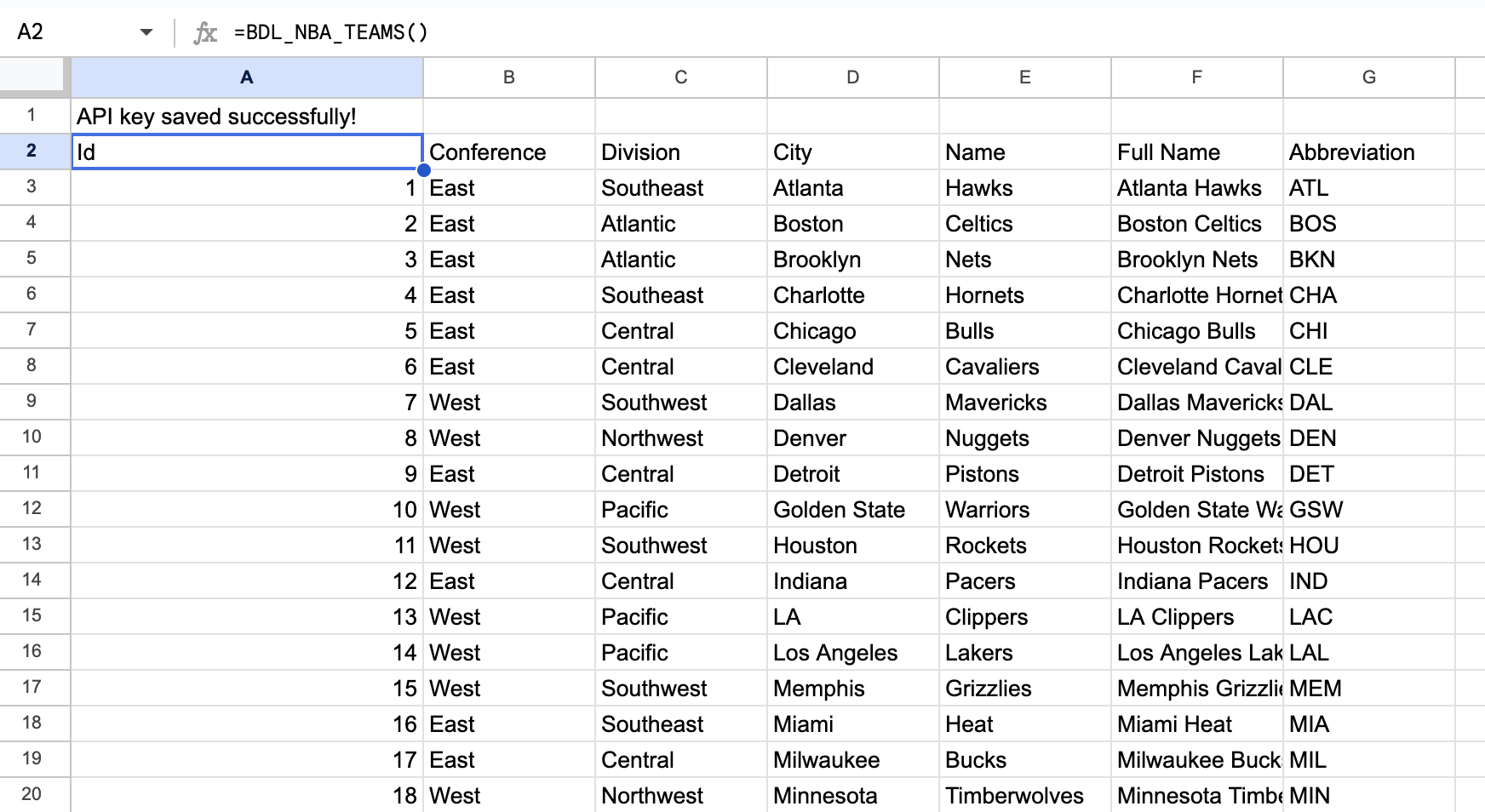
The function returns all NBA teams with their conference, division, city, and more. The data automatically fills into adjacent cells.
Example: Search for a Player
Want to find LeBron James? Try:
=BDL_NBA_PLAYERS("LeBron")
This returns player information including team, position, height, weight, and jersey number.
Example: Get Today's Games
To see today's NBA schedule:
=BDL_NBA_GAMES("2026-01-27")
Replace the date with whatever date you want. The function returns game times, teams, scores, and status.
Example: Get Current Standings
=BDL_NBA_STANDINGS(2026)
This pulls the full NBA standings for the 2025-26 season, including wins, losses, and conference rankings.
Example: Get Betting Odds
=BDL_NBA_ODDS("2026-01-27")
This returns betting lines from major sportsbooks including spreads, moneylines, and totals.
Available Sports
The integration supports all BALLDONTLIE sports:
| Sport | Function Prefix | Example |
|---|---|---|
| NBA | BDL_NBA_ | =BDL_NBA_TEAMS() |
| NFL | BDL_NFL_ | =BDL_NFL_STANDINGS(2025) |
| MLB | BDL_MLB_ | =BDL_MLB_PLAYERS("Ohtani") |
| NHL | BDL_NHL_ | =BDL_NHL_GAMES("2026-01-27") |
| WNBA | BDL_WNBA_ | =BDL_WNBA_TEAMS() |
| NCAAF | BDL_NCAAF_ | =BDL_NCAAF_RANKINGS(2025) |
| NCAAB | BDL_NCAAB_ | =BDL_NCAAB_BRACKET(2026) |
| EPL | BDL_EPL_ | =BDL_EPL_STANDINGS(2025) |
| La Liga | BDL_LALIGA_ | =BDL_LALIGA_MATCHES() |
| Serie A | BDL_SERIEA_ | =BDL_SERIEA_TEAMS() |
| Bundesliga | BDL_BUNDESLIGA_ | =BDL_BUNDESLIGA_STANDINGS() |
| Ligue 1 | BDL_LIGUE1_ | =BDL_LIGUE1_TEAMS() |
| UCL | BDL_UCL_ | =BDL_UCL_MATCHES() |
| MLS | BDL_MLS_ | =BDL_MLS_STANDINGS() |
| MMA | BDL_MMA_ | =BDL_MMA_FIGHTERS("McGregor") |
| F1 | BDL_F1_ | =BDL_F1_DRIVER_STANDINGS() |
| ATP Tennis | BDL_ATP_ | =BDL_ATP_RANKINGS() |
| WTA Tennis | BDL_WTA_ | =BDL_WTA_PLAYERS("Gauff") |
| PGA | BDL_PGA_ | =BDL_PGA_TOURNAMENTS() |
| CS2 | BDL_CS2_ | =BDL_CS2_RANKINGS() |
| LoL | BDL_LOL_ | =BDL_LOL_TEAMS() |
| Dota 2 | BDL_DOTA_ | =BDL_DOTA_HEROES() |
| FIFA World Cup | BDL_FIFA_ | =BDL_FIFA_TEAMS() |
Common Functions Reference
Here are the most popular functions:
Teams & Players
=BDL_NBA_TEAMS()- All NBA teams=BDL_NBA_PLAYERS("search")- Search players by name=BDL_NBA_PLAYERS_ACTIVE()- Only active players=BDL_NFL_ROSTER(teamId)- Full team roster
Games & Scores
=BDL_NBA_GAMES("YYYY-MM-DD")- Games by date=BDL_NBA_BOX_SCORES("YYYY-MM-DD")- Detailed box scores=BDL_NBA_BOX_SCORES_LIVE()- Live game box scores
Stats
=BDL_NBA_STATS(playerId, gameId, season)- Player game stats=BDL_NBA_SEASON_AVERAGES(playerId, season)- Season averages=BDL_NBA_LEADERS("pts", 2026)- League leaders
Standings & Rankings
=BDL_NBA_STANDINGS(2026)- Current standings=BDL_NCAAB_RANKINGS(2026)- AP Top 25=BDL_NCAAB_BRACKET(2026)- March Madness bracket
Betting
=BDL_NBA_ODDS("YYYY-MM-DD")- Game betting lines=BDL_NBA_PLAYER_PROPS(gameId)- Player prop bets=BDL_NFL_ODDS("YYYY-MM-DD")- NFL betting odds
Tips for Power Users
Refresh Data
Google Sheets caches function results. To force a refresh:
- Make a small change to any parameter
- Or press Ctrl+Shift+E to refresh all
Find IDs
Many functions need player or team IDs. Get them by first calling the list function:
=BDL_NBA_TEAMS()to find team IDs=BDL_NBA_PLAYERS("name")to find player IDs- Use those IDs in other functions
Pagination
By default, functions return 25 results. To get more, add the perPage parameter:
=BDL_NBA_PLAYERS("", "", 100)
This returns up to 100 players.
Date Format
Always use YYYY-MM-DD format for dates:
=BDL_NBA_GAMES("2026-01-27")
Generic API Function
Need an endpoint we don't have a specific function for? Use the generic function:
=BDL_API("/nba/v1/teams")
=BDL_API("/nba/v1/players", "{""search"": ""curry""}")
Troubleshooting
"API key not set" Error
Run =BDL_SET_API_KEY("your-key") in any cell first.
"Rate limit exceeded" Error
You're making too many requests. Wait a minute and try again, or upgrade your plan for higher limits.
"Loading..." Shows Briefly
This is normal - Google Sheets shows a loading state while fetching data from the API.
Data Not Updating
Use Ctrl+Shift+E to force a refresh, or slightly modify a function parameter.
Full Documentation
For the complete list of 150+ functions and all available parameters, see:
Get Help
- Discord: Join our community at discord.gg/cQJhfTPn8j
- Email: hello@balldontlie.io
- Documentation: balldontlie.io/docs
Start building your sports analysis spreadsheet today - no coding required.